
Use OData
Explains how the Reporting API uses OData, including the service root URLs, resource paths, query options, logical operators, and the rate limit.
Prerequisites
- FAQ: Your email address must be enabled for Reporting API access.
The Reporting API uses the Open Data Protocol (OData) to extract platform engagement and performance data for your users into the BI tool of your choice.
URL components
Section titled “URL components”The URL used to extract data has three components: the service root URL, the resource path, and the query options.
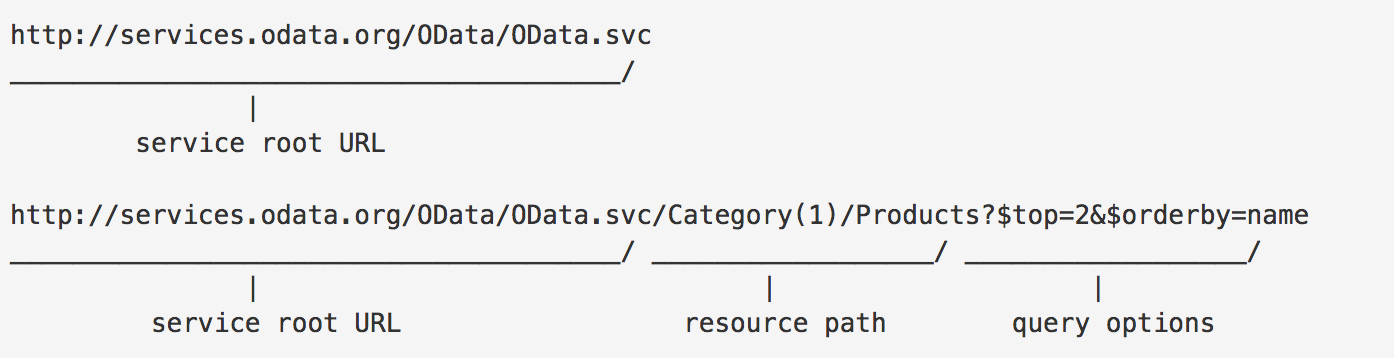
Service root URL
Section titled “Service root URL”Access the OData feed by entering the service root URL. The Reporting API has two service root URLs to query and extract data. Use the one that applies to your region.
| Region | Service root URL |
|---|---|
| Global / Standard | https://admin.mindtickle.com/Odata.svc |
| US region | https://admin.prod-us.mindtickle.com/Odata.svc |
Resource path
Section titled “Resource path”To extract data, specify the table name in the URL. Append the table name to the service root URL.
For example, to access the LearnerModulePerformances table:
https://admin.mindtickle.com/Odata.svc/LearnerModulePerformancesQuery options
Section titled “Query options”Append query options to filter, sort, or format the data.
-
Filtering: Use the
$filtersystem query option to extract specific records. For example, filter by a specificModuleId:https://admin.mindtickle.com/Odata.svc/LearnerModulePerformances?$filter=ModuleId eq '123456789012345101' -
Output format: The default output format is XML. Change it to JSON or CSV with the
$formatoption. For example, download as CSV:https://admin.mindtickle.com/Odata.svc/LearnerModulePerformances?$format=csv
Logical operators
Section titled “Logical operators”The Reporting API supports the following logical operators. These syntax examples use illustrative fields: Title is a string and Total is numeric. Use the field names and types defined in your table metadata. Quote string literals; do not quote numeric literals.
| Operator | Value | Condition | Example |
|---|---|---|---|
| Equals | eq |
True if the left operand is equal to the right operand. | $filter=Title eq 'Manager' |
| Not equals | ne |
True if the left operand is not equal to the right operand. | $filter=Title ne 'Manager' |
| Greater than | gt |
True if the left operand is greater than the right operand. | $filter=Total gt 100 |
| Greater than or equal | ge |
True if the left operand is greater than or equal to the right operand. | $filter=Total ge 100 |
| Less than | lt |
True if the left operand is less than the right operand. | $filter=Total lt 100 |
| Less than or equal | le |
True if the left operand is less than or equal to the right operand. | $filter=Total le 100 |
| Logical and | and |
True if both operands evaluate to true. | $filter=Title eq 'Manager' and Total eq 100 |
| Logical or | or |
True if either operand evaluates to true. | $filter=Title eq 'Manager' or Total eq 100 |
Combining query options
Section titled “Combining query options”Combine filtering and formatting in a single query with the ampersand (&) symbol. For example, extract data for a specific ModuleId in CSV format:
https://admin.mindtickle.com/Odata.svc/LearnerModulePerformances?$filter=ModuleId eq '123456789012345101'&$format=csvFor more details, see the OData URL conventions documentation.
Rate limit
Section titled “Rate limit”The Reporting API allows a maximum of 5 requests per second. Ensure your integration respects this rate limit to avoid service interruptions.